
Mini Block Craft - Google Play
Sie können Ergebnisse sehen in einige Sekunden.
Herausgeberbeschreibung
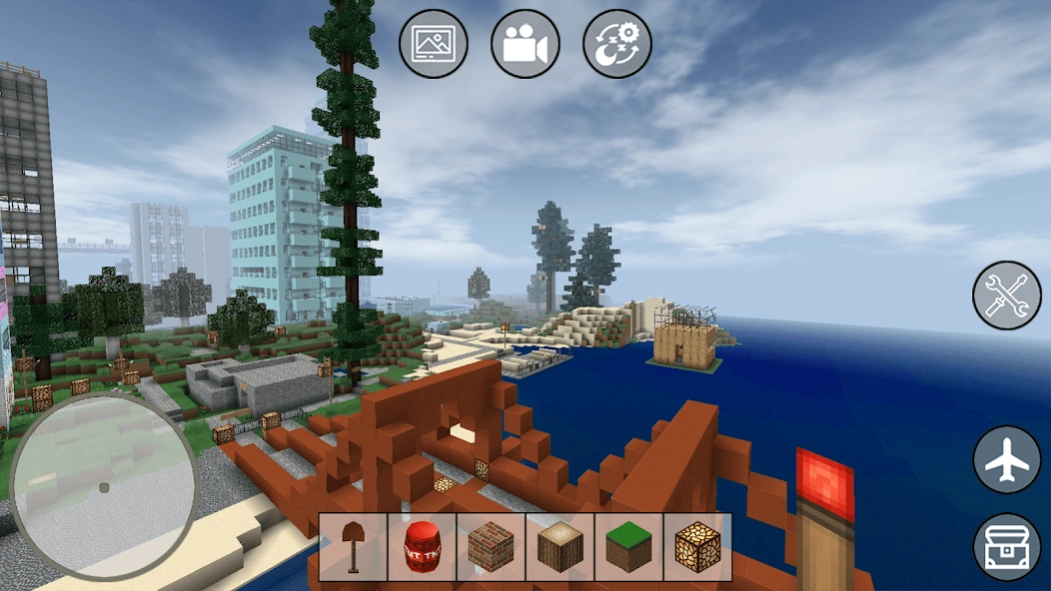


Mini Block Craft. Kreativ und Survival in der Welt der Sandkastenblöcke!
Mini Block Craft. Kreativ und Survival in der Welt der Sandkastenblöcke!
In diesem Pixelstil-Sandbox-Openworld-Blockspiel. Sie können erstellen, was Sie wollen!
Verwandeln Sie Blöcke in Baumaterial und erstellen Sie Ihr Traumhaus oder erkunden Sie die Karte und kämpfen Sie gegen gefährliche Monster und Zombies. Bastle, baue und erforsche eine erstaunliche Wohnwelt!
Erkunde Gebiete, sammle und nutze Ressourcen für die Entwicklung deines Besitzes.
Mini Block Craft Spiel: Der beste Simulator ist keine offizielle Mojang-Anwendung. Dieses Spiel ist nicht mit Minecraft Pocket Edition verbunden oder verbunden. Minecraft ist eine Marke von Mojang und wird weder vom Ersteller dieses Spiels noch von dessen Lizenzgebern gebilligt.
Über Mini Block Craft
Das Unternehmen, das Mini Block Craft entwickelt, ist Build Block Studio - XingTang Software. Die neueste vom Entwickler veröffentlichte Version ist 1.0.
Um Mini Block Craft auf Ihrem Android-Gerät zu installieren, klicken Sie einfach auf die grüne Schaltfläche Weiter zur App oben, um den Installationsvorgang zu starten. Die App ist seit 2026-11-11 auf unserer Website gelistet und wurde 0 Mal heruntergeladen. Wir haben bereits geprüft, ob der Download-Link sicher ist; zu Ihrem eigenen Schutz empfehlen wir jedoch, die heruntergeladene App mit Ihrem Antivirusprogramm zu scannen. Ihr Antivirusprogramm kann Mini Block Craft als Malware erkennen, wenn der Download-Link zu mini.block.craft.free.mc defekt ist.
So installieren Sie Mini Block Craft auf Ihrem Android-Gerät:
- Klicken Sie auf unserer Website auf die Schaltfläche Weiter zur App. Dadurch werden Sie zu Google Play weitergeleitet.
- Sobald Mini Block Craft im Google-Play-Eintrag Ihres Android-Geräts angezeigt wird, können Sie den Download und die Installation starten. Tippen Sie auf die Schaltfläche Installieren unter der Suchleiste und rechts neben dem App-Symbol.
- Es wird ein Popup-Fenster mit den von Mini Block Craft benötigten Berechtigungen angezeigt. Klicken Sie auf Akzeptieren, um den Vorgang fortzusetzen.
- Mini Block Craft wird auf Ihr Gerät heruntergeladen und der Fortschritt angezeigt. Sobald der Download abgeschlossen ist, beginnt die Installation und Sie erhalten eine Benachrichtigung, nachdem die Installation abgeschlossen ist.
Programmdetails
Allgemein
Systemanforderungen
Download-Informationen
Preisgestaltung
Versionsgeschichte
Version
veröffentlicht am 2026-11-11
NEW: Real World Ctaft Maps — explore and build in real places! Generate playable worlds from real-world map data and walk the streets of actual cities.IMPROVED: Multiplayer is now faster and more stable, with smoother connections and better in-game sync.OPTIMIZED: Major performance upgrades with dramatically lower memory usage — the game now runs smoother and more reliably, even on devices with limited RAM.
Version
veröffentlicht am 2026-09-17
NEW: Real World Ctaft Maps — explore and build in real places! Generate playable worlds from real-world map data and walk the streets of actual cities.
IMPROVED: Multiplayer is now faster and more stable, with smoother connections and better in-game sync.
OPTIMIZED: Major performance upgrades with dramatically lower memory usage — the game now runs smoother and more reliably, even on devices with limited RAM.
Version
veröffentlicht am 2026-09-17
NEW: Real World Ctaft Maps — explore and build in real places! Generate playable worlds from real-world map data and walk the streets of actual cities.
IMPROVED: Multiplayer is now faster and more stable, with smoother connections and better in-game sync.
OPTIMIZED: Major performance upgrades with dramatically lower memory usage — the game now runs smoother and more reliably, even on devices with limited RAM.
Version 90.5.179.mc
veröffentlicht am 2026-09-04
• In-game skin change — open the clothing dialog and tap "Change
Skin".
• Fixed head direction in third-person view.
• Fixed character orientation in replay videos.
• Default controls switched to touchpad. You can restore the classic
buttons from main-menu Settings.
• Fixed crash on older devices.
1. Lantern Block, crystal Cluster
2. Neon blocks can be pulled by piston.
3. 10000 + Furniture
Version 90.5.153.mc
veröffentlicht am 2026-06-02
1. Lantern Block, crystal Cluster
2. Neon blocks can be pulled by piston.
3. 10000 + Furniture (Add--> Import From Content to import furniture).
4. Neon blocks can be made to furniture, you can craft neon furniture.
5. Fix crash bug.
6. Fix audio bug
7. Bring back classic skins.
8. Fix character head direct bug (3rd person view)
Version 89.5.2.mc
veröffentlicht am 2025-08-17
V87.5.2.mc
Upgrade api level to 35
Fix ads policy issues
Move banner ad position.
1.Fix survival mode bug
2.Fix ad policy
Add Clothes and Skins
More furniture, new world.
5.5.2.mc Mini Block Craft
5.5.2.mc Mini Block Craft fix ad policy bug
V13.5.2.mc:
1. Add arm64 libs.
2. Upgrade target api to 28+
Mini Block Craft 15.5.2.mc :
1. Add 800+ build in furniture.
You can import furniture to your world by: Add-> Import furniture
2. Add arm64 support.
3. Change the apk file to android bundle.
Version 83.5.2.mc
veröffentlicht am 2025-03-19
V83.5.2.mc
Fix ads issues.
V74.5.2.mc
Fix ads policy issues
Move banner ad position.
1.Fix survival mode bug
2.Fix ad policy
Add Clothes and Skins
More furniture, new world.
5.5.2.mc Mini Block Craft
5.5.2.mc Mini Block Craft fix ad policy bug
V13.5.2.mc:
1. Add arm64 libs.
2. Upgrade target api to 28+
Mini Block Craft 15.5.2.mc :
1. Add 800+ build in furniture.
You can import furniture to your world by: Add-> Import furniture
2. Add arm64 support.
3. Change the apk file to android bundle.
Version 82.5.2.mc
veröffentlicht am 2025-01-22
V82.5.2.mc
Fix blocks bugs
V74.5.2.mc
Fix ads policy issues
Move banner ad position.
1.Fix survival mode bug
2.Fix ad policy
Add Clothes and Skins
More furniture, new world.
5.5.2.mc Mini Block Craft
5.5.2.mc Mini Block Craft fix ad policy bug
V13.5.2.mc:
1. Add arm64 libs.
2. Upgrade target api to 28+
Mini Block Craft 15.5.2.mc :
1. Add 800+ build in furniture.
You can import furniture to your world by: Add-> Import furniture
2. Add arm64 support.
3. Change the apk file to android bundle.
Version 74.5.2.mc
veröffentlicht am 2025-01-11
V74.5.2.mc
Fix ads policy issues
64.5.2.mc
FixGDPR
42.5.2.mc
Move banner ad position.
1.Fix survival mode bug
2.Fix ad policy
Add Clothes and Skins
More furniture, new world.
5.5.2.mc Mini Block Craft
5.5.2.mc Mini Block Craft fix ad policy bug
V13.5.2.mc:
1. Add arm64 libs.
2. Upgrade target api to 28+
Mini Block Craft 15.5.2.mc :
1. Add 800+ build in furniture.
You can import furniture to your world by: Add-> Import furniture
2. Add arm64 support.
3. Change the apk file to android bundle.
Version 68.5.2.mc
veröffentlicht am 2024-06-24
V68.5.2.mc
Fix Redmi ANR
V64.5.2.mc
Fix EEA GDPR
V42.5.2.mc
Move banner ad position.
1.Fix survival mode bug
2.Fix ad policy
Add Clothes and Skins
More furniture, new world.
5.5.2.mc Mini Block Craft
5.5.2.mc Mini Block Craft fix ad policy bug
V13.5.2.mc:
1. Add arm64 libs.
2. Upgrade target api to 28+
Mini Block Craft 15.5.2.mc :
1. Add 800+ build in furniture.
You can import furniture to your world by: Add-> Import furniture
2. Add arm64 support.
3. Change the apk file to android bundle.
Haftungsausschluss
Offizieller Google Play-Link
Wir hosten Mini Block Craft nicht auf unseren Servern. Wir haben es nicht auf Viren, Adware, Spyware oder andere Arten von Malware gescannt. Diese App wird von Google gehostet und hat deren Allgemeine Geschäftsbedingungen erfüllt, um dort gelistet zu werden. Wir empfehlen Vorsicht bei der Installation.
Der Google Play-Link für Mini Block Craft wird Ihnen von apps112.com ohne jegliche Zusicherungen, Gewährleistungen oder Garantien zur Verfügung gestellt, greifen Sie daher auf eigene Gefahr darauf zu.
Bei Fragen zu dieser speziellen App wenden Sie sich bitte direkt an den Herausgeber. Bei Fragen zu den Funktionalitäten von apps112.com kontaktieren Sie uns.
